Searching Your Collections
As your collections grow, finding the right request quickly becomes important. Curlex has two search tools — one for filtering the current sidebar view, and one for searching everything at once.
Sidebar Search
The Search box sits at the top of the Collections panel. As you type, the sidebar filters in real time to show only collections, folders, and requests whose name or URL contains your search term.
Clear the box to return to the full list.
This search works within whatever is currently visible in the sidebar. If you have many collections, this is the fastest way to jump to a known request when you know roughly where it lives.
Global Search
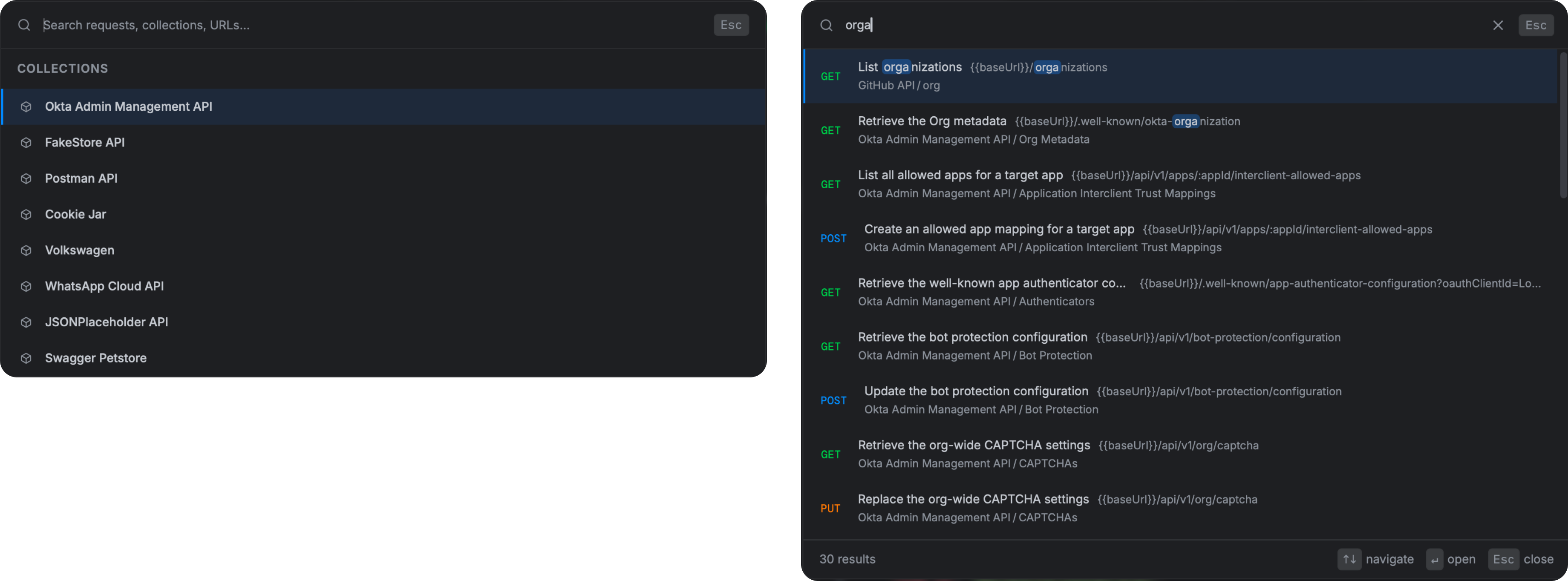
Press Cmd K (macOS) or Ctrl K (Windows) to open the global search overlay. This searches across every collection in the active workspace simultaneously — regardless of which sidebar panel is currently open.
The overlay shows matching requests as you type. Click any result to open it in a new tab.
Use global search when:
- You remember a request exists but not which collection it is in.
- You want to find all requests that call a particular URL or endpoint path.
- You need to jump to a request quickly without navigating the sidebar tree.